TREK Prime WiFi Pellet Grill Setup and User Support Guide
See your nearest dealers
Search Your Location >
Appliance Parts Company
6825 S. KYRENE ROAD
Open Map
BBQ Island Scottsdale
14987 N Northsight Blvd
Phone: 480-503-1110
Open Map
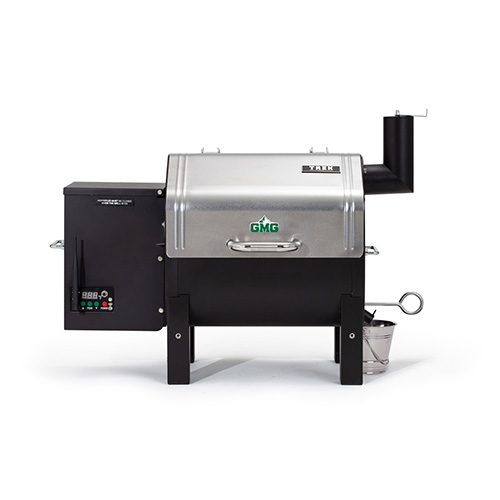
TREK Prime WiFi pellet grill by Green Mountain Grills, featuring a stainless steel lid, digital control panel, and smoke stack, designed for easy assembly and outdoor cooking.

TREK

PRIME

Thank you for purchasing our TREK Prime WiFi pellet grill. Here are a few tips to get you started.
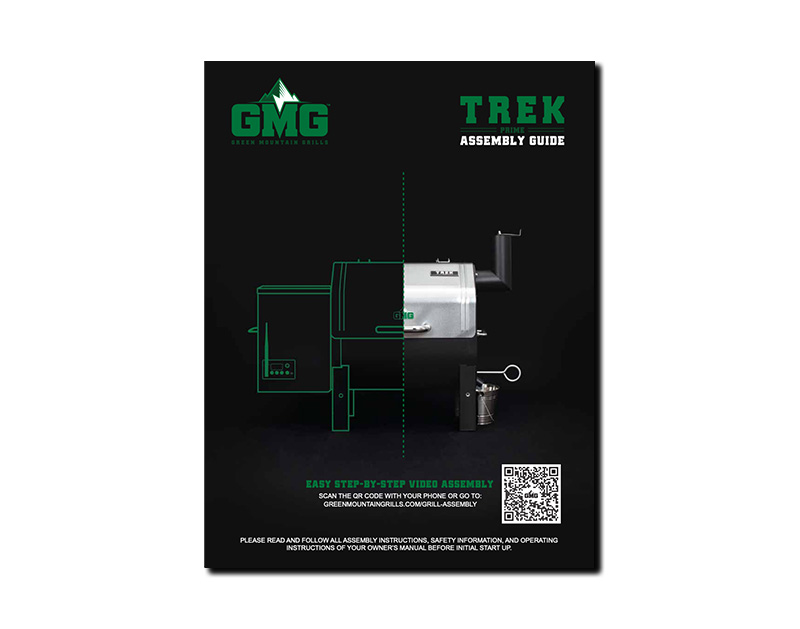
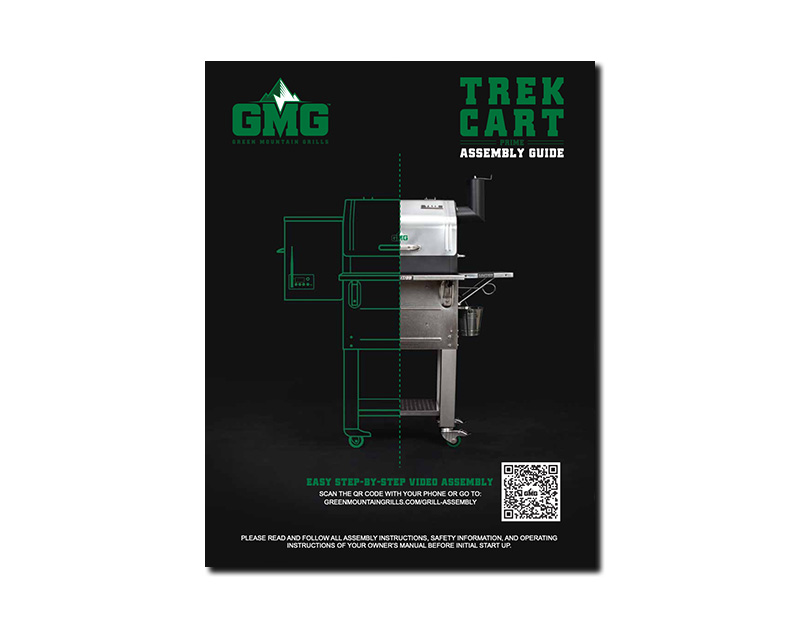
TREK Prime WiFi pellet grill assembly guide featuring the grill's design, QR code for video instructions, and Green Mountain Grills logo, set against a dark background.

Step-by-step

ASSEMBLY GUIDE

Download Here >

Owner's manual cover for Green Mountain Grills TREK Prime WiFi pellet grill, featuring logo, title, and smoke rising from grill.

Grill Owners

MANUAL

Download Here >

gmg app, prime app manual display

GMG APP

MANUAL

Download Here >

TREK Cart assembly guide for Green Mountain Grills, featuring a side view of the TREK Prime WiFi pellet grill with assembly instructions and QR code for video support.

TREK CART

ASSEMBLY GUIDE

Download Here >

Safety First warning sign emphasizing safety precautions for grill setup and usage.

Before you set up your grill, make sure to keep the entire grill a minimum of 48 inches from all combustibles.

Reference your owner’s manual for all safety information.
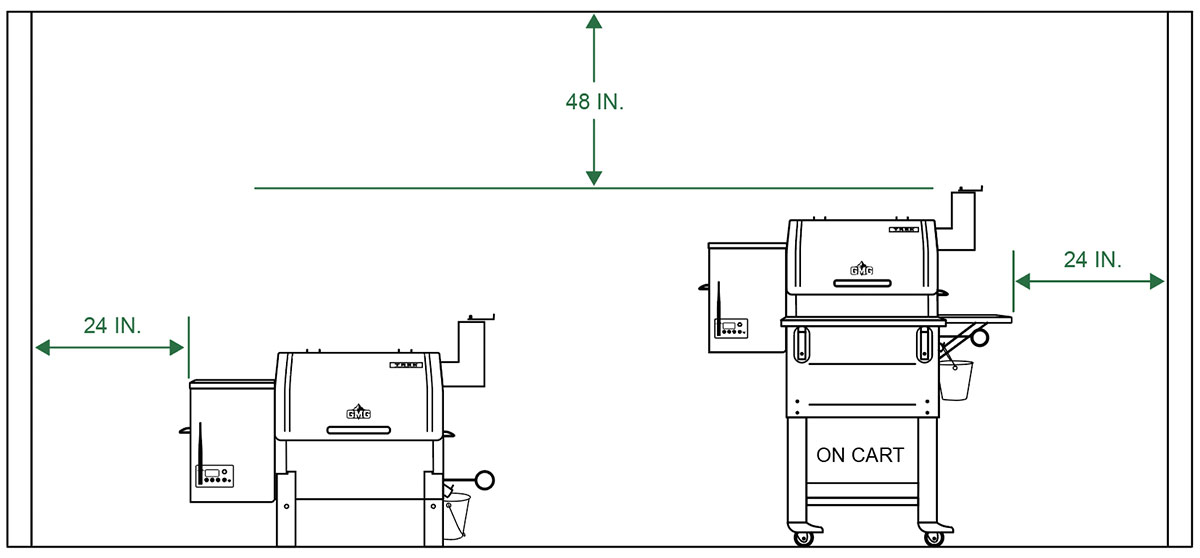
Diagram showing the safety dimensions for the TREK Prime WiFi pellet grill, indicating a minimum distance of 48 inches from combustibles and dimensions of 24 inches on either side, with a clear view of the grill setup.
Gear icon with a wrench, symbolizing maintenance and assembly support for TREK Prime WiFi pellet grill by Green Mountain Grills.

Easy step-by-step

GRILL INSTRUCTION

View More Prime Videos >

GMG Davy Crockett pellet grill with assembly instructions, surrounded by grilling spices and wooden planks, set against a rustic wooden background.
Green Mountain Grills TREK Prime WiFi pellet grill logo design, featuring a modern and sleek emblem suitable for branding and promotional materials.

Proper installation of

HEAT SHIELD
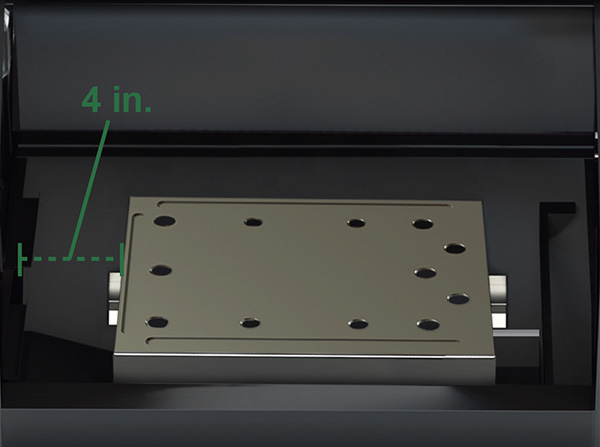
Heat shield installation guide for TREK Prime WiFi pellet grill, showing a metal shield placed 4 inches from the left wall, with visible mounting holes for proper alignment.

TREK

Approximately 4″ from inside left wall of grill

Water droplet icon representing moisture management for Green Mountain Grills TREK Prime WiFi pellet grill maintenance.

How to Install

GREASE TRAY

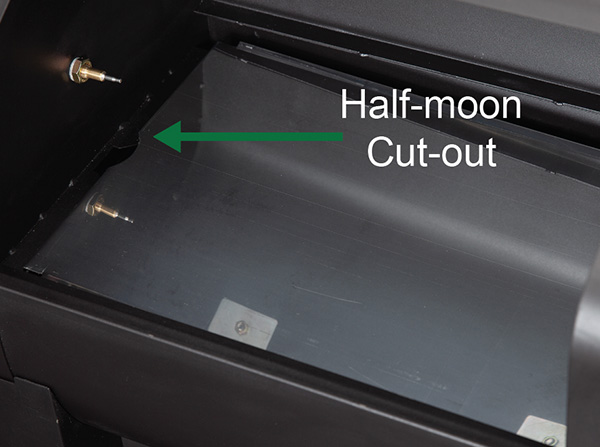
Grease tray for TREK Prime WiFi pellet grill, featuring half-moon cut-out on the left for proper grease flow into the trough.

VERY IMPORTANT:

Install the grease tray correctly according to the picture, before grilling. The half-moon cut out needs to be on the left. This ensures proper travel of grease into your grease trough and down into your grease bucket. For easy cleanup, feel free to wrap the grease tray in tin foil. MAKE SURE not to cover up the half-moon cut out on the left side near the thermal sensor.

Electrical plug icon representing power connection for Green Mountain Grills TREK Prime WiFi pellet grill setup.

Properly connecting

GRILL POWER

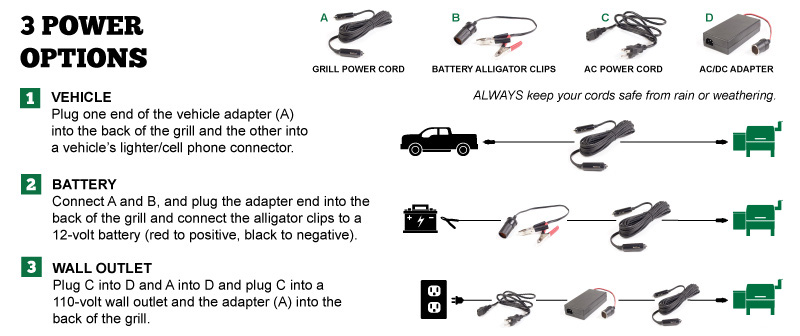
Power connection options for TREK Prime WiFi pellet grill: vehicle adapter, battery alligator clips, and wall outlet setup with accompanying cables.
Airflow icon representing ventilation and smoke management for Green Mountain Grills' TREK Prime WiFi pellet grill.

Close doors & lids for

PROPER AIRFLOW

IMPORTANT

ALWAYS CLOSE the hopper lid and ALWAYS OPEN the chimney cap before starting the grill.
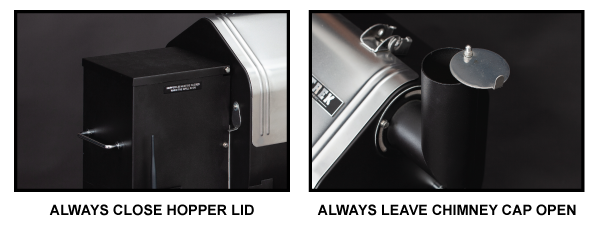
Grease tray installation and chimney cap of the Green Mountain Grills TREK Prime WiFi pellet grill, highlighting the half-moon cut out for proper grease flow and airflow management.
Power icon symbol representing 12V functionality for Green Mountain Grills, related to TREK Prime WiFi pellet grill setup and operation.

Recommended steps for

FIRST STARTUP

This procedure is a way to ensure the auger feeds pellets and primes the firebox. ONLY perform these steps on the very first startup or to fill the auger and recharge the firebox if the grills runs out of pellets during a cook.


Digital display panel of the TREK Prime WiFi pellet grill showing power status, temperature readings, and operational indicators for proper setup and usage.
Firewood logs with flames, symbolizing outdoor grilling and cooking, relevant to Green Mountain Grills' TREK Prime WiFi pellet grill resources.

Important steps for

INITIAL BURN

Burn-in the grill at 350°F for 30 minutes to remove any residue from the manufacturing process.

Green Mountain Grills logo featuring a clock symbol, representing time management and efficiency in grilling with the TREK Prime WiFi pellet grill.30 mins

Green Mountain Grills logo featuring a stylized green flame, representing the TREK Prime WiFi pellet grill brand.350°F

Caution sign with a yellow background and black exclamation mark, emphasizing safety for Green Mountain Grills' TREK Prime WiFi pellet grill users.ALWAYS allow your grill reach 150°F before adjusting the temperature.

TREK Prime WiFi pellet grill logo from Green Mountain Grills, emphasizing grilling equipment and resources for new owners.

The grill will make

ODD SOUNDS

Combustion fan inside the hopper of a Green Mountain Grill, with visible wiring and fan blades, illustrating the grill's internal components for optimal airflow and temperature control.

Huffing noises are normal.

The combustion fan, inside the hopper, will turn off and on regularly to provide the correct amount of oxygen to the fire to maintain the set temperature.

Power icon symbol representing 12V functionality for Green Mountain Grills, related to TREK Prime WiFi pellet grill setup and operation.

How to correctly

POWER DOWN

IMPORTANT: Never unplug the grill without running through fan mode.

Press the red power button to switch the grill into fan mode. DO NOT unplug the grill or press the power button while it is in fan mode. Fan mode is important as it not only cools down the grill properly but also blows ash out of the firebox for your next cook. Once fan mode is complete and the display reads “oFF”, hold down the power button for 7 secs until the screen goes dark. At this point the grill has successfully powered down. You can leave the grill plugged in for quicker power up next time or unplug it if you prefer.

Red power button and display showing "FAN" and "oFF" indicators for Green Mountain Grills TREK Prime WiFi pellet grill operation.
Power icon symbol representing 12V functionality for Green Mountain Grills, related to TREK Prime WiFi pellet grill setup and operation.

After first use steps for

STANDARD STARTUP

IF UN-PLUGGED

Plug in the grill. The display should read “off”. Press the red power button to turn it on. The unit will go through it’s 0-1-2-3 process and heat up to 150°F.
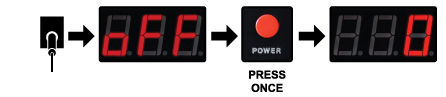
Digital display panel showing temperature readings and a red power button for the TREK Prime WiFi pellet grill, relevant for startup and fan mode instructions.

IF LEFT PLUGGED IN

The display should be dark. Press and hold the red power button for 7 secs. The display should read “off”. Press the red power button to turn the unit on. The unit will go through it’s 0-1-2-3 process and heat up to 150°F.
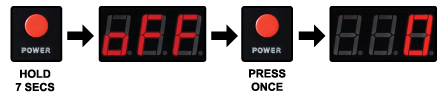
Red power button and digital display showing "oFF" and "A.F.F" for Green Mountain Grills TREK Prime WiFi pellet grill setup and operation.

Caution sign with a yellow background and black exclamation mark, emphasizing safety for Green Mountain Grills' TREK Prime WiFi pellet grill users.ALWAYS allow your grill reach 150°F before adjusting the temperature.

Vacuum cleaner icon representing cleaning tools for maintaining the TREK Prime WiFi pellet grill.

Recommended regular

GRILL CLEANING

Green Mountain Grills logo featuring a campfire with logs, representing wood-fired grilling for TREK Prime WiFi pellet grill users.

ABOUT
EVERY
2-3 BAGS
80-100LBS

ALWAYS ENSURE THAT THE GRILL IS COLD AND THE FIRE IS OUT BEFORE CLEANING.

Keep the inside of the grill clean using a Shop-Vac. This will take only a few minutes. Remove the interior parts and vacuum any ash and residue out of the base of the grill and the firebox. WAIT AT LEAST ONE HOUR AFTER TURNING OFF THE GRILL BEFORE USING THE ASHVAC.
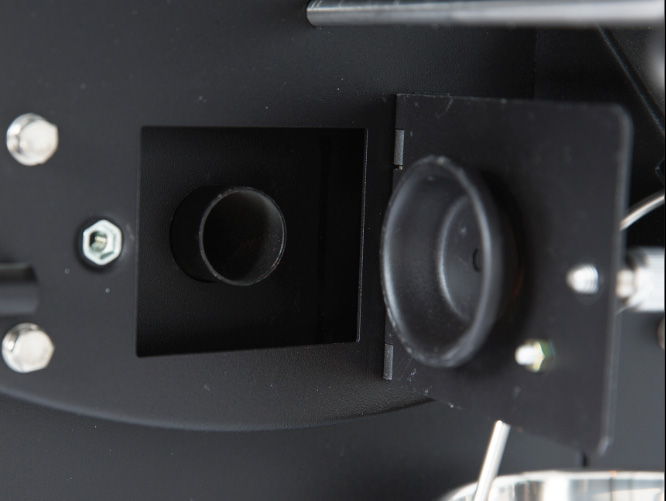
Ash clean-out door and vacuum hose connection point on Green Mountain Grills TREK Prime WiFi pellet grill for efficient ash removal.

AshVac Clean-Out

Use this method to easily clean out the firebox without removing any internal parts. Open the ash clean-out door located on the right side of the grill. Place the end of the vacuum hose over the hole of the clean-out tube that runs into the base of the burn pot. This will remove most of the excess ash from the firebox. THIS DOOR MUST BE CLOSED WHEN OPERATING THE GRILL.
Probe thermometer inserted into a cooked chicken, indicating temperature in degrees Fahrenheit, representing essential grilling tool for TREK Prime WiFi pellet grill users.

Connecting and using your

MEAT PROBES
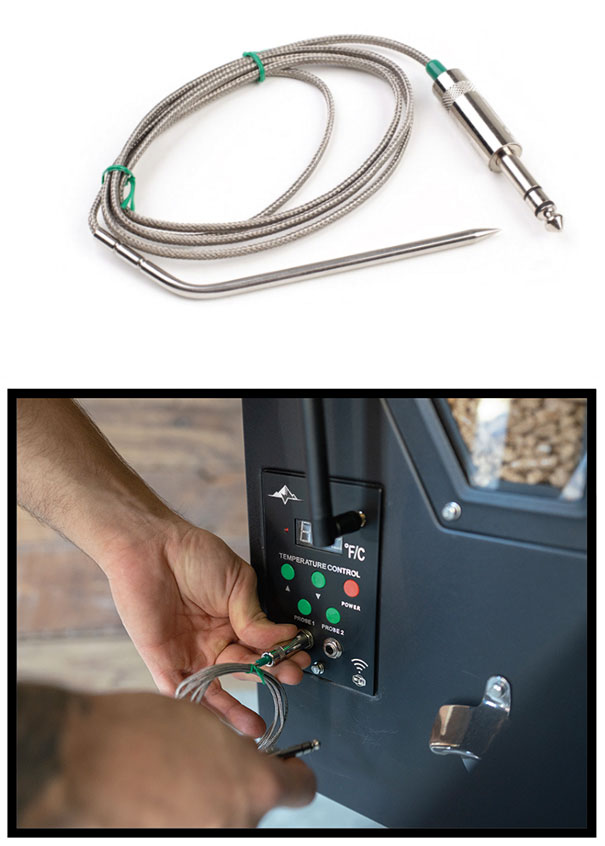
Meat probe with stainless steel tip and connector for temperature control, being plugged into the TREK Prime WiFi pellet grill's control panel.

To use this feature, just plug the connector into the receptacle on the front of the controller.

Lift the stainless flap on the left side of the grill and push the probe through the hole. Then, insert the probe into the center of the food you are cooking. Press either the Probe 1 or 2 button to display the temperature of that probe. This process takes a minute or two to stabilize.

To return to the grill temperature display, simply press the probe button again. If you do not have the probe installed in the control panel, then your digital display will read “NFD” (no food) when you press either probe button. The probe is not suitable for reading temperatures above 257°F (150°C).

IMPORTANT: Always make sure you switch back to grill temperature display before changing your grill temp.

WiFi temperature gauge icon for Green Mountain Grills TREK Prime pellet grill.

Understanding your grill’s

AIR TEMPERATURE

The PT200 Platinum Sensor sends data to the computer. This “brain” analyzes the data and adjusts the airflow and pellet fuel flow to maintain the set temperature. Many things affect the data gathered by the sensor–opening the lid, wind, grease splatter, humidity, altitude, and gravity (if the grill is not on level ground).

The computer analyzes all the erratic information and averages it over time. Then, it displays the best result as the most accurate representation of the grill’s current temperature. This is why an instantaneous air temperature reading from a third-party product does not provide much useful information.

Control panel with numbered buttons and power symbol for TREK Prime WiFi pellet grill by Green Mountain Grills.

Understanding the 0-1-2-3’s

STARTUP CYCLE
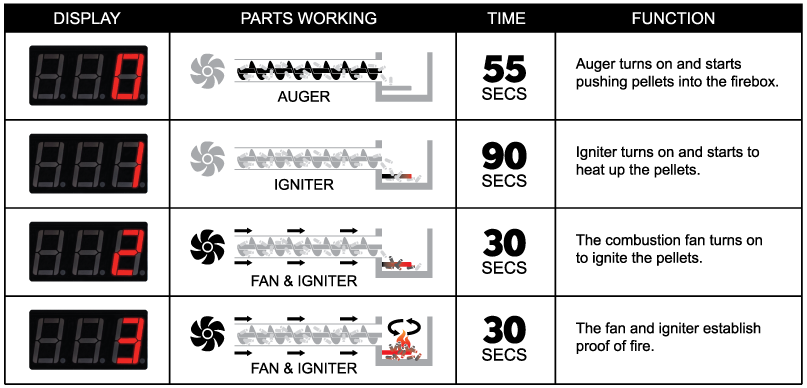
Diagram illustrating the startup cycle of the TREK Prime WiFi pellet grill, displaying digital readouts and components like the auger, igniter, and fan, with timing and function details for each stage.
Smartphone displaying the Green Mountain Grills (GMG) logo, representing digital resources for TREK Prime WiFi pellet grill users.

Welcome to new age

SMART CONTROL

TIP: The serial # on the back of your grill is your grill’s WiFi password.

ALWAYS check to make sure your grill has the latest firmware. See page 81 of your manual, for the full app guide. Also check out the Smart Control section on our website: greenmountaingrills.com/smart-control
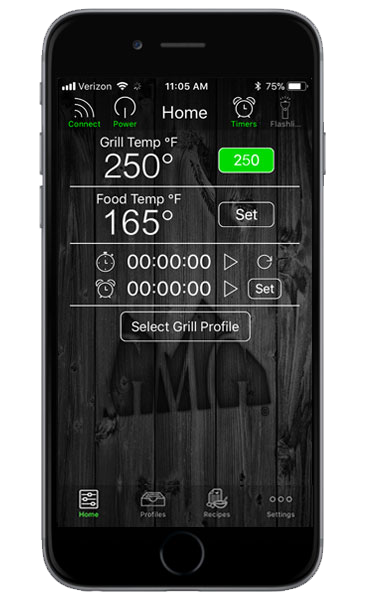

Smartphone displaying the Green Mountain Grills app interface, showing grill temperature at 250°F, food temperature at 165°F, timers, and grill profile selection options.Apple logo with "Available on the App Store" text, promoting the Green Mountain Grills app for TREK Prime WiFi pellet grill support and resources.Android app download button for Green Mountain Grills, featuring Google Play logo and Android robot icon.
Support icon featuring three people and a wrench, representing assistance and resources for Green Mountain Grills' TREK Prime WiFi pellet grill owners.

Have questions or need

SUPPORT?

Prefer visual instruction?
View our videos >

Need support? Go to:
Support Page >

3-year limited warranty badge for Green Mountain Grills, emphasizing support for TREK Prime WiFi pellet grill owners.

Grill Warranty

REGISTRATION

Register your grill and enter to win some of our Pro Accessories or a free bag of Pellets.

0
    0
    Your Cart
    Your cart is emptyReturn to Shop